Monday, April 22, 2013
How to put a web site offline and in maintenance mode.
Place a file app_offline.htm in the root site and edit the content of this file to display the message to the end user like "Site is under maintenance".

Thursday, April 11, 2013
Load Cycle of page with user control and master page .
Init Cycle:
(User Control/Custom Control) ---> Master Page ----> Page
Load Cycle:
Page ---> Master Page ----> (User Control/Custom Control)
PreRender Cycle:
Page ---> Master Page ----> (User Control/Custom Control)
Render Cycle:
Page ---> Master Page ----> (User Control/Custom Control)
(User Control/Custom Control) ---> Master Page ----> Page
Load Cycle:
Page ---> Master Page ----> (User Control/Custom Control)
PreRender Cycle:
Page ---> Master Page ----> (User Control/Custom Control)
Render Cycle:
Page ---> Master Page ----> (User Control/Custom Control)
Monday, April 8, 2013
How to work with multiple result sets using SqlDataReader?
string _connStr = ConfigurationManager.ConnectionStrings["ConnStr"].ConnectionString;
protected void Page_Load(object sender, EventArgs e)
{
// get the connection
using (SqlConnection conn = new SqlConnection(_connStr))
{
// write the sql statement to execute
string sql = "SELECT AutoID, FirstName, LastName, Active FROM
PersonalDetail ORDER BY FirstName; " +
"SELECT AutoId, FileName FROM Files Order By FileName ASC";
// instantiate the command object to fire
using (SqlCommand cmd = new SqlCommand(sql, conn))
{
conn.Open();
// in case of multiple result set you will not be able to specify the
CommandBehavior
// if so you will not be able to get the next result set from the
reader
using (SqlDataReader reader = cmd.ExecuteReader())
{
// bind the first resultset
GridView1.DataSource = reader;
GridView1.DataBind();
reader.NextResult();
// bind the second resultset
GridView2.DataSource = reader;
GridView2.DataBind();
}
conn.Close();
}
}
}
protected void Page_Load(object sender, EventArgs e)
{
// get the connection
using (SqlConnection conn = new SqlConnection(_connStr))
{
// write the sql statement to execute
string sql = "SELECT AutoID, FirstName, LastName, Active FROM
PersonalDetail ORDER BY FirstName; " +
"SELECT AutoId, FileName FROM Files Order By FileName ASC";
// instantiate the command object to fire
using (SqlCommand cmd = new SqlCommand(sql, conn))
{
conn.Open();
// in case of multiple result set you will not be able to specify the
CommandBehavior
// if so you will not be able to get the next result set from the
reader
using (SqlDataReader reader = cmd.ExecuteReader())
{
// bind the first resultset
GridView1.DataSource = reader;
GridView1.DataBind();
reader.NextResult();
// bind the second resultset
GridView2.DataSource = reader;
GridView2.DataBind();
}
conn.Close();
}
}
}
Monday, April 1, 2013
Wednesday, February 27, 2013
Windows Service with Setup installer.
Add a project WindowsServiceCSharp

A file service1.cs will be added automatically.
Service1.cs
using System;
using System.Collections.Generic;
using System.ComponentModel;
using System.Data;
using System.Diagnostics;
using System.Linq;
using System.ServiceProcess;
using System.Text;
using System.Timers;
namespace WindowsServiceCSharp
{
public partial class Service1 : ServiceBase
{
public Service1()
{ InitializeComponent();
//tm_Elapsed(null, null);
}
protected override void OnStart(string[] args)
{
Timer tm = new Timer();
tm.Interval = 60000D;
tm.Elapsed +=new ElapsedEventHandler(tm_Elapsed);
}
void tm_Elapsed(object sender, ElapsedEventArgs e)
{// do code here.
//this.Dispose();
}
protected override void OnStop()
{
}
}
}
Right click on Service1.design file and an add Installer as below.

Now a new file will be added ProjectInstaller.cs

Do the coding as per you. Now add a setup project into the solution.


Choose setup project and click on Ok.
Now right chilk on setup project(WSSetup) and add a project output.

If you want to give some user input at service installation then right click on setup project WSSetup and add a user interface as below.

Now right click on statrt and add dialog and choose a interface. (In my case TextBoxes(A)) < br />
Now add custom option to call service installer at installation.

Set CustomActionData ...

Now override the Install method of ServiceBase class in projectinstaller class as below. Before calling the base class's install method you can change the service related initialization like setting service name at installation time.(in my case SetServiceName() is called to set servivice name)
Note: User Interface input can onlu=y be access here Install method.
ProjectInstaller.cs
using System;
using System.Collections;
using System.Collections.Generic;
using System.ComponentModel;
using System.Configuration.Install;
using System.Linq;
using System.Configuration;
namespace WindowsServiceCSharp
{
[RunInstaller(true)]
public partial class ProjectInstaller : System.Configuration.Install.Installer
{
public ProjectInstaller()
{
InitializeComponent();
}
public override void Install(IDictionary stateSaver)
{
SetServiceName();
base.Install(stateSaver);
try
{
string targetDir = Context.Parameters["targetdir"];
string prm1 = Context.Parameters["Param1"];
string prm2 = Context.Parameters["Param2"];
string prm3 = Context.Parameters["Param3"];
string prm4 = Context.Parameters["Param4"];
string exePath = String.Format("{0}WindowsServiceCSharp.exe", targetDir);
Configuration config = ConfigurationManager.OpenExeConfiguration(exePath);
config.AppSettings.Settings["Param1"].Value = prm1;
config.AppSettings.Settings["Param2"].Value = prm2;
config.AppSettings.Settings["Param3"].Value = prm3;
config.AppSettings.Settings["Param4"].Value = prm4;
System.IO.File.WriteAllText(@"D:\test.txt", prm4);
config.Save();
}
catch (Exception ex)
{
throw new Exception(ex.Message);
}
}
void SetServiceName()
{
this.serviceInstaller1.ServiceName = Context.Parameters["Param1"];
}
}
}
Now build the service and setup project.
Now setup file ready to install windows service.

A file service1.cs will be added automatically.
Service1.cs
using System;
using System.Collections.Generic;
using System.ComponentModel;
using System.Data;
using System.Diagnostics;
using System.Linq;
using System.ServiceProcess;
using System.Text;
using System.Timers;
namespace WindowsServiceCSharp
{
public partial class Service1 : ServiceBase
{
public Service1()
{ InitializeComponent();
//tm_Elapsed(null, null);
}
protected override void OnStart(string[] args)
{
Timer tm = new Timer();
tm.Interval = 60000D;
tm.Elapsed +=new ElapsedEventHandler(tm_Elapsed);
}
void tm_Elapsed(object sender, ElapsedEventArgs e)
{// do code here.
//this.Dispose();
}
protected override void OnStop()
{
}
}
}
Right click on Service1.design file and an add Installer as below.

Now a new file will be added ProjectInstaller.cs

Do the coding as per you. Now add a setup project into the solution.


Choose setup project and click on Ok.
Now right chilk on setup project(WSSetup) and add a project output.

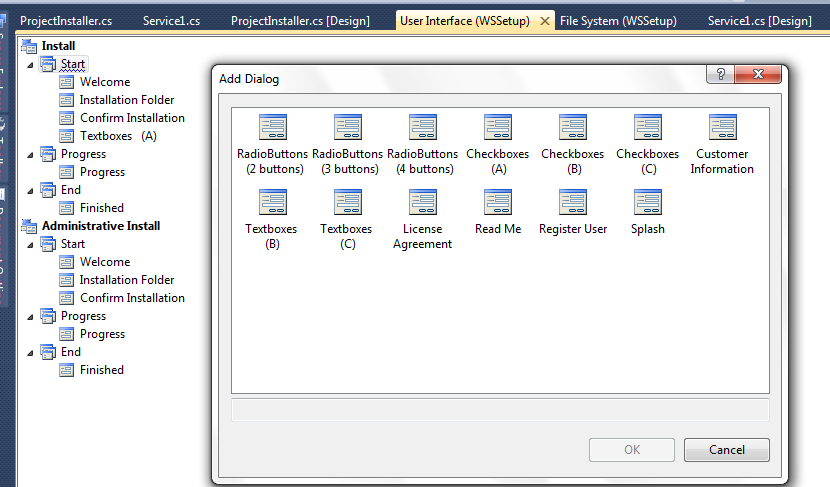
If you want to give some user input at service installation then right click on setup project WSSetup and add a user interface as below.

Now right click on statrt and add dialog and choose a interface. (In my case TextBoxes(A)) < br />
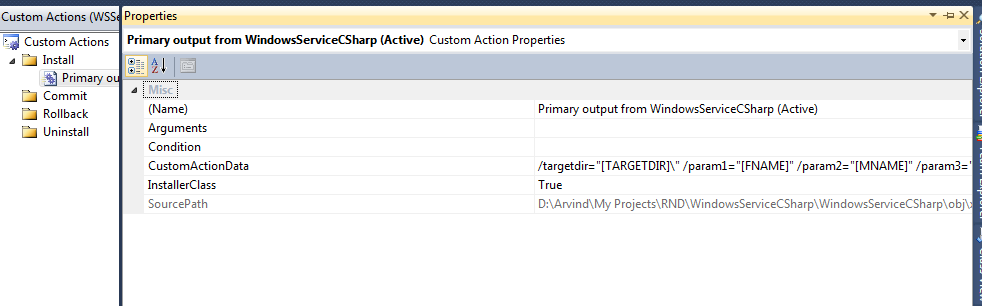
Now add custom option to call service installer at installation.

Set CustomActionData ...
Now override the Install method of ServiceBase class in projectinstaller class as below. Before calling the base class's install method you can change the service related initialization like setting service name at installation time.(in my case SetServiceName() is called to set servivice name)
Note: User Interface input can onlu=y be access here Install method.
ProjectInstaller.cs
using System;
using System.Collections;
using System.Collections.Generic;
using System.ComponentModel;
using System.Configuration.Install;
using System.Linq;
using System.Configuration;
namespace WindowsServiceCSharp
{
[RunInstaller(true)]
public partial class ProjectInstaller : System.Configuration.Install.Installer
{
public ProjectInstaller()
{
InitializeComponent();
}
public override void Install(IDictionary stateSaver)
{
SetServiceName();
base.Install(stateSaver);
try
{
string targetDir = Context.Parameters["targetdir"];
string prm1 = Context.Parameters["Param1"];
string prm2 = Context.Parameters["Param2"];
string prm3 = Context.Parameters["Param3"];
string prm4 = Context.Parameters["Param4"];
string exePath = String.Format("{0}WindowsServiceCSharp.exe", targetDir);
Configuration config = ConfigurationManager.OpenExeConfiguration(exePath);
config.AppSettings.Settings["Param1"].Value = prm1;
config.AppSettings.Settings["Param2"].Value = prm2;
config.AppSettings.Settings["Param3"].Value = prm3;
config.AppSettings.Settings["Param4"].Value = prm4;
System.IO.File.WriteAllText(@"D:\test.txt", prm4);
config.Save();
}
catch (Exception ex)
{
throw new Exception(ex.Message);
}
}
void SetServiceName()
{
this.serviceInstaller1.ServiceName = Context.Parameters["Param1"];
}
}
}
Now build the service and setup project.
Now setup file ready to install windows service.
Wednesday, February 20, 2013
How to concatenate columns separated by comma using sql xml.
Concatenate the Revision against soft
Select Soft , LEFT(Revision , LEN(Revision)-1) as Revision
FROM
(
Select Soft,
( Select Convert(VARCHAR,Revision)+',' from tblName x where x.soft= y.soft
for xml path('')
) as revision
from tblName y
group by soft
)ask
output
| Soft | Revision |
| 1 | 1 |
| 1 | 2 |
| 1 | 3 |
| 2 | 2 |
| 2 | 4 |
| 3 | 5 |
Select Soft , LEFT(Revision , LEN(Revision)-1) as Revision
FROM
(
Select Soft,
( Select Convert(VARCHAR,Revision)+',' from tblName x where x.soft= y.soft
for xml path('')
) as revision
from tblName y
group by soft
)ask
output
| Soft | Revision |
| 1 | 1,2,3 |
| 2 | 2,4 |
| 3 | 5 |
Friday, November 23, 2012
How to find jobs associated to a sql table?
Select sj.* from MSDB.dbo.sysjobsteps ss
Inner Join msdb..sysjobs sj On sj.job_id = ss.job_id
Where ss.command like '%tblUser%'
oR
select sj.*
from MSDB.dbo.sysjobsteps ss
inner join MSDB.dbo.sysjobs sj
on sj.job_id=ss.job_id,
(select so.*
from sysobjects so
inner join syscomments sc
on sc.id=so.id
where so.type='p'
and sc.text like '%tblUser%'
)aa
where ss.command like '%tblUser%'
or
ss.command like '%'+ aa.name +'%'
Inner Join msdb..sysjobs sj On sj.job_id = ss.job_id
Where ss.command like '%tblUser%'
oR
select sj.*
from MSDB.dbo.sysjobsteps ss
inner join MSDB.dbo.sysjobs sj
on sj.job_id=ss.job_id,
(select so.*
from sysobjects so
inner join syscomments sc
on sc.id=so.id
where so.type='p'
and sc.text like '%tblUser%'
)aa
where ss.command like '%tblUser%'
or
ss.command like '%'+ aa.name +'%'
Subscribe to:
Posts (Atom)